The 5-Step IoT Device Audit: Find and Secure Every Forgotten Computer on Your Network
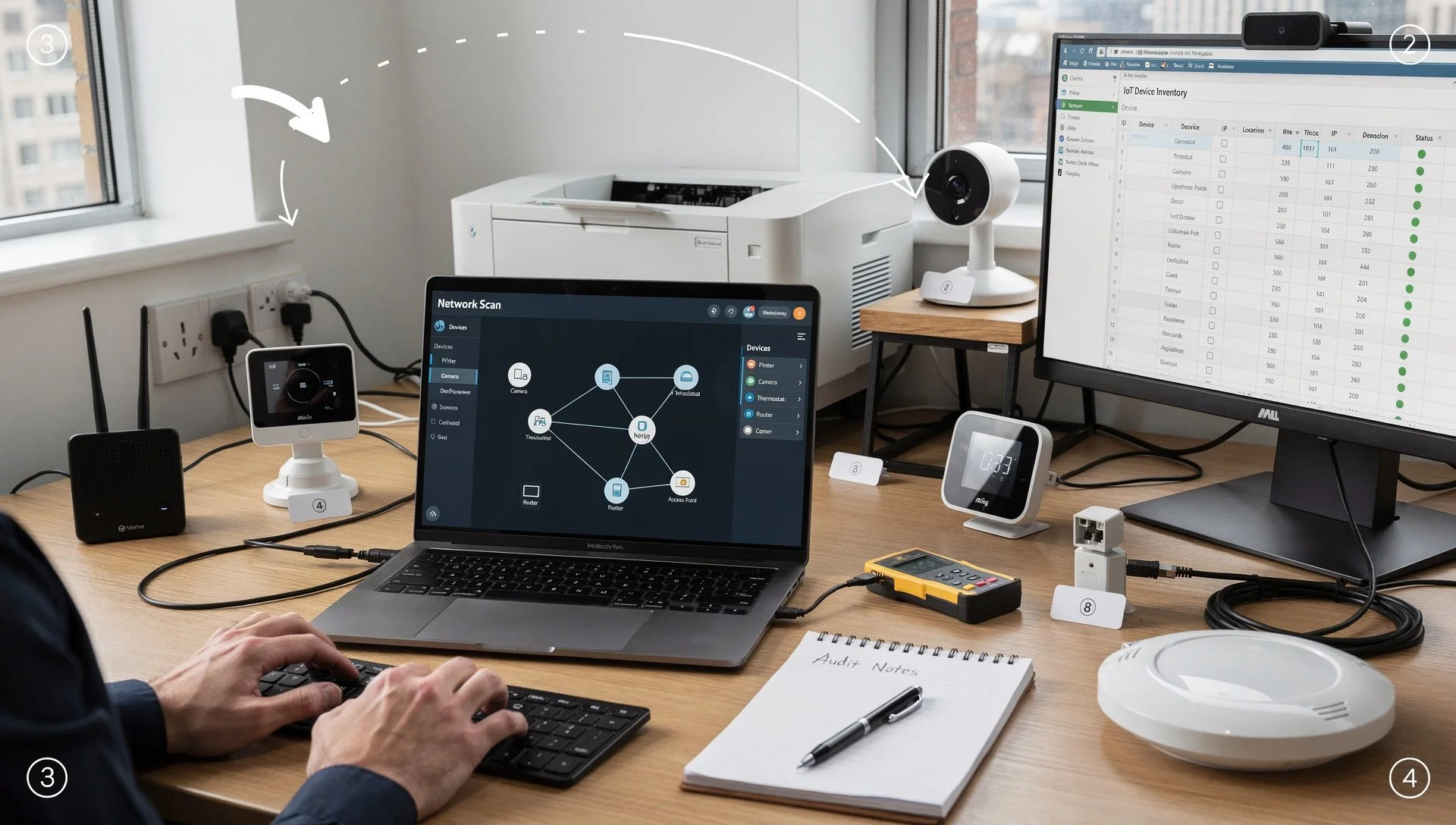
After Monday's podcast about the marketing agency breach through an unsecured printer, the most common question we've received is: "How do I actually do this audit myself?"
Fair question. Telling business owners they have a problem is easy. Providing practical steps to fix it is harder. This guide walks you through conducting a comprehensive IoT device audit and implementing security measures that don't require enterprise budgets or dedicated security teams.
Time Investment: 4-6 hours for initial audit, 2-3 hours monthly for ongoing management
Cost: Free to £200 for basic network scanning tools
Difficulty: Intermediate (can be done by office managers with IT support)
Step 1: Discovery - What's Actually Connected?
You can't secure what you don't know exists. The first step is discovering every device with network connectivity in your organisation.
Network Scanning (1-2 hours)
Tools Needed:
Fing (free mobile app or desktop version)
Advanced IP Scanner (free Windows tool)
Angry IP Scanner (free cross-platform alternative)
Process:
Download and install your chosen scanning tool. Fing is most user-friendly for non-technical users. Advanced IP Scanner provides more detailed information for IT administrators.
Connect to your business network. Ensure you're on the main business WiFi or wired network, not guest WiFi. You need access to see all connected devices.
Run a complete network scan. This discovers every device with an IP address on your network. Depending on network size, this takes 5-30 minutes.
Export results to a spreadsheet. Most tools allow CSV export. This becomes your master device inventory.
What You'll See:
IP addresses for every connected device
Device names (often manufacturer default names)
MAC addresses (hardware identifiers)
Device types (when identifiable)
Open network ports and services
Red Flags During Scanning:
Devices you don't recognise
Multiple devices from manufacturers you've never heard of
Devices with default manufacturer names (e.g., "HP-Printer-Admin")
Unexpected open ports (especially administrative ports like 22, 23, 80, 443, 8080)
Physical Audit (1-2 hours)
Network scanning discovers devices currently powered on and connected. Physical audits find devices that might be offline or intermittently connected.
Process:
Walk every area of your premises. Include server rooms, storage areas, back offices, meeting rooms, reception areas, and forgotten corners.
Identify anything with network connectivity:
Printers and multifunction devices
CCTV cameras and recorders
Network-attached storage devices
WiFi access points
Smart thermostats and building controls
VoIP phones
Door access control systems
Point-of-sale terminals
Digital signage displays
Any device with an Ethernet port or WiFi capability
Document physical location. Note where each device is located, not just what it is. "Reception printer" is more useful than "HP printer."
Check for devices not found in network scan. These might be powered off, disconnected, or misconfigured.
Documentation Review (30 minutes)
Review purchase orders, installation records, and contractor documentation to identify devices that might be missed:
Equipment included in office fit-outs
Systems installed by external contractors
Devices purchased by different departments
Legacy equipment from previous IT providers
Step 2: Inventory Creation and Ownership Assignment
Raw discovery data is useful, but an actionable inventory requires structure and assigned responsibility.
Create Master Inventory Spreadsheet
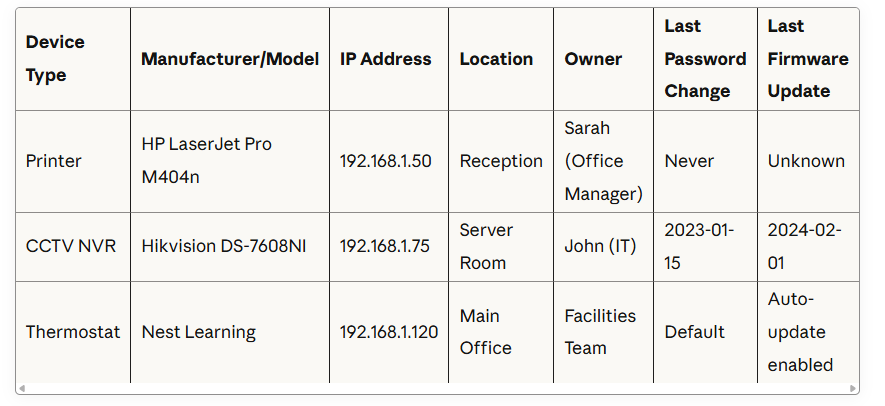
Required Columns:
Device Type (Printer, Camera, Thermostat, etc.)
Manufacturer and Model
Serial Number (where accessible)
IP Address
Physical Location
Date Installed
Responsible Owner (named individual)
Last Password Change Date
Last Firmware Update Date
Administrative Access URL
Notes
Example Entries:
Assign Explicit Ownership
Every device needs one named individual responsible for its security. Not a department. Not a team. One person.
Ownership Responsibilities:
Changing default passwords
Applying firmware updates
Monitoring security advisories
Reviewing access logs (where available)
Decommissioning process when device is replaced
Document ownership explicitly. Email each owner confirming their responsibility. This isn't bureaucracy, it's accountability that prevents "not my problem" syndrome.
Step 3: Security Assessment - What's Actually Vulnerable?
Now you know what you have and who's responsible. Next step: assess what's actually vulnerable.
Default Credential Check (1-2 hours)
For each device in your inventory:
Locate administrative interface. This is usually a web interface accessible by typing the device IP address into a browser (e.g., http://192.168.1.50).
Attempt login with default credentials. Common defaults:
admin/admin
admin/password
admin/1234
root/root
root/password
(blank username)/admin
Manufacturer-specific defaults (search "[manufacturer] [model] default password")
Document results. If default credentials work, mark as CRITICAL PRIORITY in your inventory.
If you successfully log in with defaults, someone else can too. This is your highest priority fix.
Firmware Version Check (1-2 hours)
For each device:
Access administrative interface (using default credentials if necessary, or contact responsible owner for current credentials).
Locate current firmware version. Usually found in System, About, or Settings menus.
Check manufacturer website for latest version. Compare current installed version with latest available.
Document firmware status in inventory: Current, Outdated, or Unknown.
Network Exposure Assessment (30 minutes)
Review network scanning results for devices with exposed administrative ports (22, 23, 80, 443, 8080, 3389).
Check if devices are accessible from the internet. Use Shodan.io to search for your public IP address and see what's visible externally.
Document internet exposure as CRITICAL if devices are directly accessible from outside your network.
Step 3: Security Assessment - What's Actually Vulnerable?
Now you know what you have and who's responsible. Next step: assess what's actually vulnerable.
Default Credential Check (1-2 hours)
For each device in your inventory:
Locate administrative interface. This is usually a web interface accessible by typing the device IP address into a browser (e.g., http://192.168.1.50).
Attempt login with default credentials. Common defaults:
admin/admin
admin/password
admin/1234
root/root
root/password
(blank username)/admin
Manufacturer-specific defaults (search "[manufacturer] [model] default password")
Document results. If default credentials work, mark as CRITICAL PRIORITY in your inventory.
If you successfully log in with defaults, someone else can too. This is your highest priority fix.
Firmware Version Check (1-2 hours)
For each device:
Access administrative interface (using default credentials if necessary, or contact responsible owner for current credentials).
Locate current firmware version. Usually found in System, About, or Settings menus.
Check manufacturer website for latest version. Compare current installed version with latest available.
Document firmware status in inventory: Current, Outdated, or Unknown.
Network Exposure Assessment (30 minutes)
Review network scanning results for devices with exposed administrative ports (22, 23, 80, 443, 8080, 3389).
Check if devices are accessible from the internet. Use Shodan.io to search for your public IP address and see what's visible externally.
Document internet exposure as CRITICAL if devices are directly accessible from outside your network.
Step 4: Remediation - Actually Fix the Problems
Assessment without action is pointless. Now implement fixes systematically.
Priority 1: Change Default Credentials (Immediate)
For Every Device with Default Credentials:
Generate unique, strong password. Use a password manager to create and store 16+ character random passwords. Never reuse passwords across devices.
Change administrative password through device interface.
Document password change in inventory with date completed.
Store credentials securely. Password manager accessible to device owner and backup administrator only.
Test new credentials immediately to confirm they work.
Do not postpone this step. Default credentials are the most common entry point for breaches.
Priority 2: Update Firmware (This Week)
For Devices with Outdated Firmware:
Review update release notes to understand changes and potential impacts.
Schedule maintenance window. Some firmware updates require device reboots. Plan accordingly.
Back up current configuration (where possible) before updating.
Apply firmware update following manufacturer instructions.
Verify device functionality after update.
Document update completion in inventory.
Create ongoing update schedule. Quarterly firmware reviews minimum, monthly for high-risk devices (internet-facing or handling sensitive data).
Priority 3: Implement Basic Network Segmentation (This Month)
Minimum Viable Segmentation:
Create separate VLAN for IoT devices (printers, cameras, thermostats, access control).
Restrict IoT VLAN access to essential services only. No direct access to file servers, databases, or sensitive systems.
Implement firewall rules between VLANs to control traffic.
Move devices to appropriate VLANs systematically.
This requires IT expertise. Work with your IT provider or MSP to design and implement appropriate segmentation for your environment.
Step 5: Ongoing Management - Keep It Secure
Security is not a one-time project. It requires ongoing management and regular reviews.
Monthly Tasks (1 hour)
Device Inventory Review:
Run network scan to identify new devices
Update inventory with any additions
Remove decommissioned devices
Verify ownership assignments remain accurate
Firmware Update Check:
Review manufacturers' security advisories
Check for available firmware updates
Schedule and apply critical updates
Quarterly Tasks (2-3 hours)
Comprehensive Security Review:
Full network scan and physical audit
Verify all passwords changed within last 12 months
Review network segmentation effectiveness
Test administrative access controls
Update documentation and procedures
Access Audit:
Review who has administrative access to each device
Remove access for former employees
Verify password manager access control
Annual Tasks (4-6 hours)
Full Security Assessment:
Complete device inventory from scratch
Penetration testing of IoT devices (if budget permits)
Review and update security policies
Training for device owners on security responsibilities
Common Challenges and Solutions
"We Don't Have Time for This"
Reality Check: You definitely don't have time for breach recovery, regulatory investigations, and customer notifications after an incident.
Solution: Start with highest-risk devices (internet-facing, handling sensitive data) and expand gradually. Even partial coverage is better than none.
"Our IT Provider Should Be Doing This"
Maybe. Check your service agreement. Many MSPs focus on traditional IT infrastructure and don't include IoT device management.
Solution: Explicit conversation with IT provider about IoT security. Clarify responsibilities and update service agreements if necessary.
"This Seems Complicated"
It's Not. This audit process is systematic but not technically complex. Office managers with basic IT literacy can conduct most steps.
Solution: Start with discovery and inventory. That alone provides visibility into your security gaps. Remediation can happen incrementally.
"We Can't Afford Professional Help"
You Can't Afford Not To. But basic IoT security doesn't require expensive consultants.
Solution: Use free scanning tools, follow manufacturer security guidance, and implement basic network segmentation with your existing IT provider.
Tools and Resources
Free Network Scanning:
Fing (mobile and desktop): https://www.fing.com
Advanced IP Scanner (Windows): https://www.advanced-ip-scanner.com
Angry IP Scanner (cross-platform): https://angryip.org
Password Management:
Bitwarden (free for basic use): https://bitwarden.com
1Password (team plans): https://1password.com
KeePass (free, open-source): https://keepass.info
Security Guidance:
NCSC IoT Security Guidance: https://www.ncsc.gov.uk/collection/device-security-guidance
UK Government IoT Code of Practice: https://www.gov.uk/government/publications/secure-by-design
Device Inventory Template: Download our free IoT device inventory template: https://thesmallbusinesscybersecurityguy.co.uk/resources
The Bottom Line
The marketing agency breach we discussed this week was entirely preventable. Every step in this guide would have prevented that incident.
You don't need enterprise budgets or dedicated security teams to secure IoT devices. You need systematic processes, assigned ownership, and regular reviews.
Start this week. Pick one high-risk device. Change its password. Update its firmware. Assign someone to own it. Then move to the next device.
Security is built incrementally through consistent action, not achieved instantly through massive projects.
Your printer is a computer. Your camera is a computer. Your thermostat is a computer. Start treating them that way.
About Graham Falkner
Graham is a regular contributor to The Small Business Cyber Security Guy podcast, specializing in practical security implementation for resource-constrained organisations. His focus is on translating security theory into actionable steps that small businesses can actually implement.
Need Help?
If you need assistance conducting an IoT device audit or implementing these security measures, contact us at hello@thesmallbusinesscybersecurityguy.co.uk
Related Resources:
Monday's Podcast: Episode 30: The Devices You Forgot Were Computers
Tuesday's Analysis: Your £15,000 Security Investment Just Got Defeated by a £300 Printer
Wednesday's Perspective: Why Smart People Keep Ignoring Smart Device Security
Download free device inventory template: https://thesmallbusinesscybersecurityguy.co.uk/resources
Remember: Everything in this guide is for general guidance and educational purposes. It's meant to point you in the right direction but shouldn't be treated as professional advice tailored specifically to your business. Your situation is unique. When in doubt, get a second opinion from someone who can see your specific situation.